Breaker trips when nothing is plugged in: What to do
Quick answer
A breaker can trip with nothing visibly plugged in because the circuit may still supply hardwired lights, fans, alarms, controls, outdoor equipment, hidden receptacles, or a shared area. An immediate or repeat trip can also indicate a wiring, ground-fault, arc-fault, moisture, or breaker problem. After one hazard-free reset at most, leave a breaker off if it trips again and call a licensed electrician.
Common questions
- Why does my breaker trip when nothing is plugged in?
- Nothing plugged in does not mean the circuit has no load. It may still serve lights, fans, alarms, controls, outdoor equipment, or hidden receptacles. A wiring fault, moisture, an arc or ground fault, or a breaker problem can also trip it.
- What if the breaker trips immediately with everything unplugged?
- Leave it off and call a licensed electrician. An immediate retrip is not an overload experiment to repeat; it can indicate a persistent fault in fixed equipment, wiring, a device, or the protective breaker.
- Can rain make a breaker trip when nothing is plugged in?
- Yes. Moisture can affect outdoor receptacles, exterior lights, garages, basements, crawlspaces, pumps, and damaged wiring. Do not touch wet equipment or reset a circuit exposed to water; have a qualified electrician evaluate it.
- Does a tripping breaker mean the breaker is bad?
- Not by itself. A breaker can be operating correctly in response to overload, short-circuit, ground-fault, or arc-fault conditions. A qualified electrician should test the circuit and verify the exact listed breaker before recommending replacement.
Source note: Reviewed November 9, 2026 against current Eaton and Schneider Electric breaker guidance, CPSC home-wiring guidance, and ESFI breaker and water-damage safety resources. Breaker indications and diagnostic procedures are product-specific; the exact manufacturer instructions control.
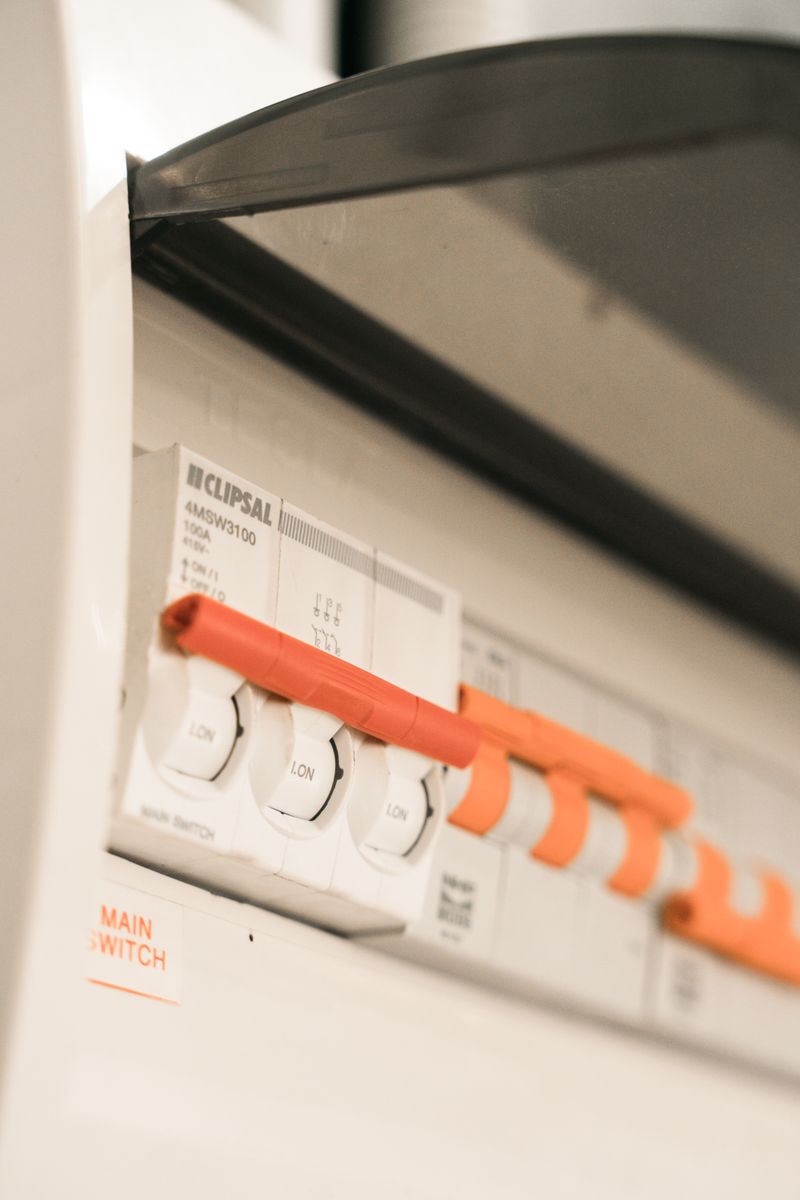
If a breaker trips when nothing is plugged in, the circuit is not necessarily empty. It may still power hardwired lights, fans, smoke alarms, HVAC controls, outdoor equipment, or receptacles you have not found. If it trips immediately or trips again after one hazard-free reset, leave it off and call a licensed electrician.
Do not keep resetting it to see whether it will hold. A breaker that opens repeatedly is reporting a condition that needs to be identified, not an inconvenience to bypass.
Stop immediately for these warning signs
Keep away from the panel and affected equipment when you notice:
- Smoke, flame, active arcing, or a fire alarm
- A burning or hot-plastic smell
- Crackling, sizzling, or new loud buzzing
- Scorching, melting, discoloration, or unusual heat
- A shock, tingling sensation, or visible damaged wiring
- Water at the panel, receptacle, fixture, appliance, or affected area
- An instant retrip or any unexplained repeat trip
For smoke, flame, or active arcing, get everyone outside, stay outside, and call 911. For the other conditions, leave the circuit off and arrange urgent licensed-electrical service; call emergency services if the condition is active or worsening. Do not approach electrical equipment while standing on a wet surface.
Why “nothing plugged in” may still mean a load
A branch circuit rarely follows the boundaries of one room. The same breaker may supply visible receptacles plus equipment you do not think of as plugged in.
Possible hardwired or overlooked loads include:
- Ceiling lights, recessed lights, exhaust fans, and switched fixtures
- Hardwired smoke or carbon-monoxide alarms
- Doorbells, thermostats, security equipment, and HVAC controls
- Dishwashers, disposals, range hoods, or under-cabinet lighting
- Exterior lights, outdoor receptacles, garage equipment, or irrigation controls
- Attic, basement, crawlspace, closet, or adjacent-room receptacles
- A sump pump, condensate pump, or other equipment behind stored items
Some equipment cycles automatically, so a delayed or random trip may occur long after you last used the room. Do not open a box, fixture, appliance, disconnect, or panel to prove what is connected. Instead, record everything that lost power and compare it with the existing circuit directory.
Use trip timing to describe the problem
Timing does not identify a failed part, but it gives the electrician a much better starting point.
| What happens | What it can indicate | Safe next step |
|---|---|---|
| Trips instantly when reset, with accessible plug-in loads removed | A persistent short, ground fault, arc fault, fixed-equipment fault, wiring problem, or protective-device issue | Leave it off; call a licensed electrician |
| Trips when a light switch or hardwired device operates | A fault in that fixture, control, fixed equipment, or its wiring | Leave the circuit and device off; report the exact control used |
| Trips after several minutes or hours | A hidden or cycling load, overload, heat-related fault, loose/damaged connection, or equipment problem | Stop resetting; record elapsed time and what was operating |
| Trips during rain, high humidity, a leak, or after flooding | Moisture affecting outdoor, garage, basement, crawlspace, or fixed equipment | Do not touch wet equipment; leave the circuit off and arrange qualified evaluation |
| Trips randomly when the home seems quiet | An automatic load, intermittent wiring/equipment fault, moisture, or an AFCI/GFCI event | Record time, weather, and everything that lost power; call an electrician if it repeats |
If the handle will not latch, that narrower symptom belongs in the breaker-will-not-reset guide. Do not hold the handle in position or try to force it on.
Standard, GFCI, AFCI, and dual-function breakers trip differently
The breaker type changes what the trip may mean:
- A standard thermal-magnetic breaker responds to overload and short-circuit current.
- A GFCI breaker also responds when current takes an unintended path, helping protect against shock.
- An AFCI breaker also detects current patterns associated with dangerous arcing.
- A dual-function breaker combines AFCI and GFCI protection in addition to ordinary circuit-breaker protection.
Do not confuse a combination AFCI, which detects both series and parallel arcing, with a dual-function AFCI/GFCI device. The visible labels and exact model matter; use the breaker type guide for identification without removing the panel cover.
Trip lights and codes are not universal. Eaton’s current residential product guide lists seven stored trip categories for supported Type CH AFCI breakers and notes a product-family difference for Type BR. Schneider Electric documents a different Time Saver Diagnostics procedure for supported QO, QOB, and Homeline products.
Record any light or code visible after the trip, along with the brand and model. Do not apply a blink chart from another product or run a reset sequence copied from a generic video. Give the information to the electrician, who can use the instructions for that exact breaker. The focused AFCI tripping guide covers arc-fault-specific patterns without treating the protection as a nuisance.
Make a circuit-inventory worksheet
Create the map from normal controls and safe observations only. Do not repeatedly energize the circuit to complete it.
| Record this | What to write down |
|---|---|
| Breaker | Directory label, visible amp rating, brand/model, TEST button, and any light or code |
| Trip timing | Instant, after a switch action, after a delay, intermittent, or associated with weather |
| Areas without power | Rooms, individual receptacles, lights, fans, alarms, outdoor points, and fixed equipment |
| Accessible plug-in loads | What was unplugged, including power strips, chargers, appliances, and items behind furniture |
| Hardwired or automatic loads | Lights, fans, alarms, controls, pumps, outdoor equipment, and appliances that may cycle |
| Recent changes | Electrical work, drilling, hanging cabinets, leaks, storms, new equipment, or moved furniture |
| Warning signs | Heat, odor, sound, discoloration, shock, water, flicker, or partial power |
Do not move a suspect appliance to another circuit to “prove” it is safe. Do not turn loads on solely to reproduce the trip.
What not to do
- Do not remove the panel cover or touch conductors, terminals, bus parts, or breaker mounting points.
- Do not swap the breaker, move it to another position, or substitute a standard breaker for AFCI/GFCI protection.
- Do not disconnect fixtures, separate conductors, isolate neutrals, or open receptacle boxes as a test.
- Do not perform live voltage, current, resistance, insulation-resistance, or megger testing.
- Do not install a larger breaker or assume the existing breaker is defective.
- Do not bypass a protective device or repeat resets until the breaker stays on.
If the breaker or panel is unusually warm, stop touching it and follow the hot-breaker safety guide. A breaker can be operating correctly in response to a dangerous fault, so replacing it without diagnosing the circuit can remove the messenger while leaving the problem.
Prepare a quote-ready electrician handoff
Tell the electrician that the breaker trips after accessible plug-in loads are removed. Share the worksheet plus closed-panel photos only when conditions are dry, cool, quiet, and otherwise normal.
Ask the electrician to scope diagnosis of:
- The full circuit inventory, including hidden, hardwired, outdoor, and shared-area loads
- The trip timing and exact AFCI, GFCI, or dual-function indication
- Fixed equipment, receptacles, switches, fixtures, and branch-circuit wiring
- Moisture exposure and recent construction or electrical work
- Breaker-to-panel compatibility and the reason for any recommended replacement
- Repair, testing, permit, inspection, and return-to-service requirements
Use the electrician handoff checklist to keep names, model numbers, photos, timing, and quote questions together. The goal is not merely to make the breaker hold; it is to find why the protective device operated and make the circuit safe to return to service.
Sources
- Eaton: Residential product guide and AFCI trip codes
- Schneider Electric: Breaker protection types
- Schneider Electric: QO, QOB, and Homeline Time Saver Diagnostics
- U.S. Consumer Product Safety Commission: Guide to home wiring hazards
- Electrical Safety Foundation International: Fuse and breaker breakdown
- Electrical Safety Foundation International: Water-damaged electrical equipment
Continue the safe breaker diagnostic path
Use these resources to identify the protective device, separate a reset problem from a repeat trip, and prepare a precise electrician handoff.
- Identify the breaker type
Recognize standard, AFCI, GFCI, and dual-function breakers from visible markings.
- AFCI breaker trip patterns
Follow the focused path when an arc-fault breaker reports a repeat trip.
- Breaker will not reset
Use the separate stop conditions when the handle will not latch after one safe attempt.
- Electrician handoff checklist
Organize trip timing, circuit inventory, warning signs, photos, and quote questions.

Amperage HQ Editorial Team
Independent trade-focused editorial team